This post was originally posted on 06-08-26
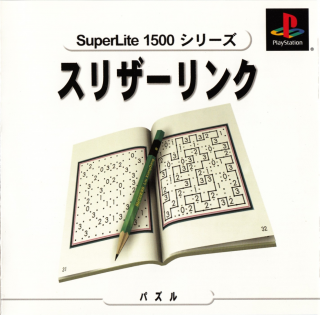
Last fall I finally picked up an Ambernic 35XX H. I've had a huge rom collection for years but finally got around to getting a new handheld for playing them away from my PC, since my GP2X Wiz hasn't had the battery life left to really use for years now and is underpowered by today's standards anyway. So, I've spent a long time just going through and sampling random roms that caught my eye, even if just for a minute or two, and while going through Japanese PSX roms I saw the cover for Slitherlink on PS1.
I'm a long time fan of logic puzzles along the likes of sudoku, picross/nonograms, kakuro, etc. So this immediately got my attention.
Slitherlink, as it turns out, is a logic puzzle developed by Japanese publisher Nikoli at the end of the 80s and has been a staple of their puzzle magazines since. The basic concept is that you have a grid with some numbers, and dots-and-boxes style you need to draw a single looped line where each numbered box has that number of edges filled in around it (i.e., if there's a box with the number 2, the loop line needs to touch two of that box's sides). There can't be any loose ends, it has to be one continuous clean loop.
Though this is a pretty simple concept and a pretty simple set of rules, I've found it to be significantly harder than picross or sudoku, which is exactly what I've been looking for because I've hit a point where those puzzles feel more like going through the motions than really puzzle solving to me anymore. Slitherlink has hit an itch I haven't hit for quite a while in terms of challenge. Like those puzzles, there are a lot of little tricks and shortcuts to learn for solving them. For me, part of the joy of this type of puzzle is learning some of these myself and developing an instinct for them over time. However, I feel that if you start out on these puzzles without knowing ANY tricks to solving them, you're going to get frustrated fast. I don't intend to dive deep myself into strategies for solving them here, instead I'd recommend this great page by Jonathan Olson on solving them. If you're the type of person who prefers to learn these strategies on your own through doing them, I'd recommend at least reading the sections "Basic Numbers", "Corner Cases" and look at "Annotated Example" to see how a 3 next to a 0 is done. Those should be enough to get you started.
Instead, the reason I wanted to write a quick blog post is that I wanted to post about digital adaptations of Slitherlink in a format I could easily link people who are interested. There are not nearly as many digital versions of Slitherlink as there are of, say, sudoku, and many are in larger puzzle compilation games, making them hard to find by name. They also tend to vary a lot in their controls, so I'll talk about that a bit. That part might not mean much to you until after you've tried a Slitherlink puzzle for yourself, but after you have you'll have a better sense of how you'd like the controls to be. If anyone has found a Slitherlink game they really like not mentioned here, please let me know about it! But below are my recommendations, and a bit of info about other options.
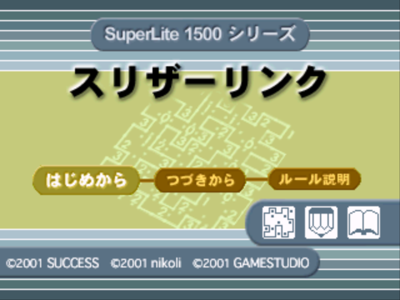
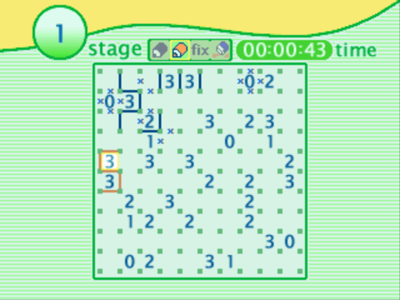
Though there are different Slitherlink games I've played at this point, the first one I found ends up being my favorite, and that's the PS1 game I mentioned at the beginning. The interface is pleasant, the controls are largely good, there's 100 puzzles--half 10x10 and half 10x18, and I still haven't finished all of the larger ones. The controls are a bit different than many I've played--you toggle between lines and X's (press the button once for a line and a second time to make it an X, a third will erase it), but it interestingly uses all of the PS1 face buttons to do this directionally based on what box you've highlighted with the d-pad. So, on the box you've highlighted, the triangle button is toggling the lines/X's for the top edge, the circle button is toggling the right edge, etc. It's perfectly effective, although it may be more button presses than games that don't toggle through the options.
The biggest reason I recommend this version though is the orange pencil mode. I don't know what else to call this, it's kind of the equivalent of being able to write little numbers of valid options when doing sudoku, but this version gives you a second pencil to draw in lines you might not be so sure about, and this is absolutely the killer feature of this one. They've also really thought this feature through. You can't write over a blue (normal) line with an orange line, so you get kind of built in protection for the lines you're confident on, but you CAN overwrite an orange one with a blue one, so it's easy to lock in the ones you've decided are good. But beyond that, they've added two more buttons that make it even better. The first is the "fix" button, which will let you automatically convert all of your orange marks to blue ones. The second is the orange eraser, which as you might guess will erase all your orange marks when you realize that you've completely got it all wrong. This feature is excellent and it's disappointing that I haven't seen it in other games.
The big caveat is that you are almost definitely going to be emulating this (I mean, definitely buy it if you want, I doubt it's going to be worth the ~$40 shipped unless you are in Japan and can find it at a thrift store for more like $5). For some people that's absolutely no problem, for other people who have never touched emulators and roms this might be an issue. And if you're like me and these types of puzzles are largely things you want to play laying in bed on a handheld, that's going to mean needing a handheld you can play it on. But if emulating a PS1 game for this is a perfectly acceptable solution to you, then this is by far my first pick.
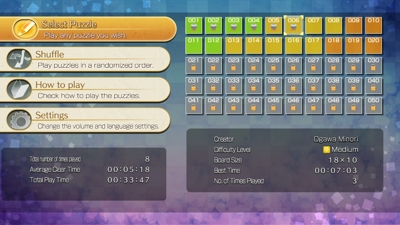
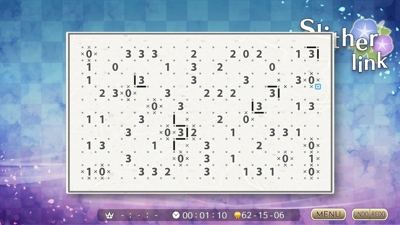
I just found this last night, which prompted me to write about this. This is the most modern version I've found on consoles (versus mobile or browser options), and is by Nikoli themselves. It's pretty barebones, but frankly most are, and frankly this type of puzzle game doesn't really need much else. It has a basic manual (and given that it's just a series of images and text, manual is a lot more fair to say than tutorial). It shows about 50 puzzles, not sure if you might unlock more if you finish those but it is (as of writing this) only a $5 title so that wouldn't be too unreasonable relative to how long harder puzzles can take. The puzzle sizes start at 10x10, but I have not unlocked all of them to know how large they get--24x14 is the largest I can peek ahead to. I do think it's interesting that it credits the designers of the specific puzzles, that's not something you see much. Control-wise, it's not my favorite of the pack but it's absolutely fine after you do a puzzle or two and get used to it. In this one, you hold a button while you move the d-pad to make marks. Holding A will get you a solid line, holding Y will get you X's, and holding B erases. If you are playing the Switch undocked, you can also use the touch screen, but I haven't tried that method out much. This is probably the easiest one to recommend to people if you own a Switch, because it's cheap, very approachable, available in English, and doesn't require knowing how to emulate anything. There's not really any kind of special features that make this one stand out, it's just clean and functional and modern and easy to get and play.
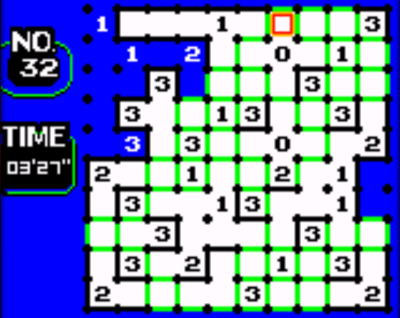
This time, the game I'm recommending is actually three games, so let me untangle that first so you have any hope of downloading the right ones. These games were released for the Nintendo Power, confusingly not the magazine in America, but the flash cartridge Japan had for the Gameboy with little buttons on the face to switch between the games you would download from kiosks. I won't go on and on about obscure game hardware trivia here, but I specify this because if you like buying retro games, don't bother looking for cartridges for these, you're not going to find them (unless it's in the form of a Nintendo Power cartridge that has them on them, then godspeed). The three games you are looking for are Loppi Puzzle Magazine - Kangaeru Puzzle Soukangou, Loppi Puzzle Magazine - Kangaeru Puzzle Dai-2-Gou, and Loppi Puzzle Magazine - Kangaeru Puzzle Dai-3-Gou. There are at least three other Loppi titles that follow this same naming format, but instead of "Kangaeru Puzzle" (Thinking Puzzle) it's "Hirameku Puzzle" (Inspiration Puzzle). So when you're going through roms looking for them, that's the key thing to pay attention to.
Being a Gameboy game, almost anything that will let you run emulators will be fine for playing this one, compared to the PS1 game where older hardware may not. This is also a Japanese title, but there's almost no reading to do, you can tell the puzzles apart by the icons and the only other menu I'm aware of is the one asking if you want to continue a previously saved puzzle, which...well...now you know. Each one has eight 4x4 puzzles, eight 8x8 puzzles, and sixteen 10x10 puzzles, so just shy of 100 puzzles in total between them. I was surprised that despite the small screen they managed to fit 10x10 puzzles, and they're perfectly readable. The inclusion of 4x4 puzzles makes this one I'd recommend to beginners particularly, since many of the other options don't get smaller than 8x8 or 10x10. The controls are simple but effective, you hold a button then hit the dpad to mark the corresponding line. Do it a second time to erase that mark. So, you can hold A and hit the up arrow to mark the top line of a highlighted box, or hold B and do the same for an X. Well, actually, in this game instead of X's it simply erases the line entirely, which I find to be pretty nice and I assume was due to not having a ton of pixels to work with. I kind of wish this was an option other games had. One particularly nice feature I like that the previous suggestions don't have as well is that it will automatically fill in "dead" squares (that are completely blocked off either by lines or X's, so no part of the loop could reach them) with the blue window background. It makes it a whole lot easier to visualize the parts you don't need to worry about anymore and it's again a feature I wish others had.
I'll add two last stray thoughts on this one. One gripe that is absolutely not the fault of this game but I'll put it out there anyway: if you're someone who uses RetroAchievements, this game does have them, but for some reason whoever set these up required that you do fulfill each one in a single session. So, there will be an achievement for clearing puzzles 1-8, but you have to do all 8 puzzles in one session. That's pretty obnoxious especially if you're playing on a handheld that could lose battery. And my second parting comment is that these collections also include sudoku and picross puzzles, so if you're a fan of those you'll get those as a bonus.
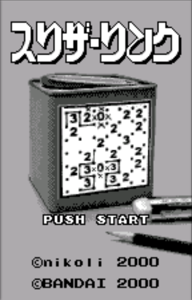
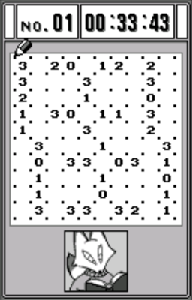
There's a few other Slitherlink games I've vaguely touched when investigating them that I think are fine, but not ones that would be my first choices. However, more puzzles is never a bad thing, and you may have specific hardware reasons to seek out some of these. So, here's a few more:
The Wonderswan version of Slitherlink honestly seems completely fine to me, but the issue is that it's a vertical Wonderswan game. I never found a key config for my Ambernic where this was comfortable to actually play veritcally, and it was too small and awkward to scale it down to play on the screen horizontally. On a device with a larger screen or more buttons or on an actual Wonderswan, I suspect this one is perfectly good, it just didn't really fit the hardware I wanted to play it on.
I wanted Slitherlink on my (Android) phone, but the last thing I wanted was an ad riddled hellhole of an app, and unfortunately that sure is what a lot of this type of logic puzzle app is. A lot of the apps I found also had too many weird variants I didn't care that much about, like puzzles with hex grids or whatever. I settled on getting the Conceptis Slitherlink app. I do like that it has puzzle packs available that I can just pay for without a bunch of mobile game monetization nonsense, and you get a decent number to play for free. And it has a LOT of packs available, you won't run out of puzzles here and you have a lot of difficulty options. However, I can't say I love the controls, obviously it's touch based on a phone but it's a very barebones tap to draw a line, tap again to draw an x, tap again to erase. Dragging would have been a nice option at least, but no luck there. It's barebones, but at least it's not scummy.
Most of the Slitherlinks browser options I've seen are either extremely antiquated and janky or...the kind of janky where it feels like someone's quick project for a class. The only halfway clean option I've found is Slitherlinks.com. It appears to be extremely new, has daily challenges, accounts if you want them to track stats. You can click and drag for lines, use right click for X's, you can generate new puzzles on the fly, etc. It's not perfect but it's completely usable. My main concern with recommending it is...the lingering threat that it's a vibecoded project. Some of the text on the site is absolutely LLM-generated ("We built a comprehensive platform that respects the puzzle's Japanese origins (数回 - "number loops")" might be the funniest example of talking about the most bog standard Japanese thing as some sort of revered spiritual concept I've seen yet), but the rest I have no idea, and hate that I have to even be suspicious of this shit.
There's a few I haven't investigated yet at all, but I know they exist out there somewhere. I'll leave them here for you to investigate, or maybe I'll come back to them sometime. I'm not going to include browser or mobile games here, because there's an endless stream of those if you search, many of which are just flat out slop, and it's just too much to dig through.
And that's it, go play some Slitherlink!